Features
Everything that makes Inkli's handwriting indistinguishable from real pen on paper
Technology
The most realistic printed handwritten mail ever created
Individual Glyph Definition
Every character is rendered uniquely — no two letters share identical strokes. Variation in size, slant, and form mirrors real handwriting behaviour.
Pen Physics Mimicking
Ink density, pressure, bleed, and grain are simulated per-stroke. The result captures the tactile quality of fountain pen on cotton paper.
Handwriting Defects
Subtle tremor, baseline drift, and spacing irregularity are introduced naturally — the imperfections that make handwriting feel human.
Over 50 handwriting styles
From writing to print
See the ink presets in action
The same letter transformed — from editor to print-ready output with ink texture, bleed, and character applied.
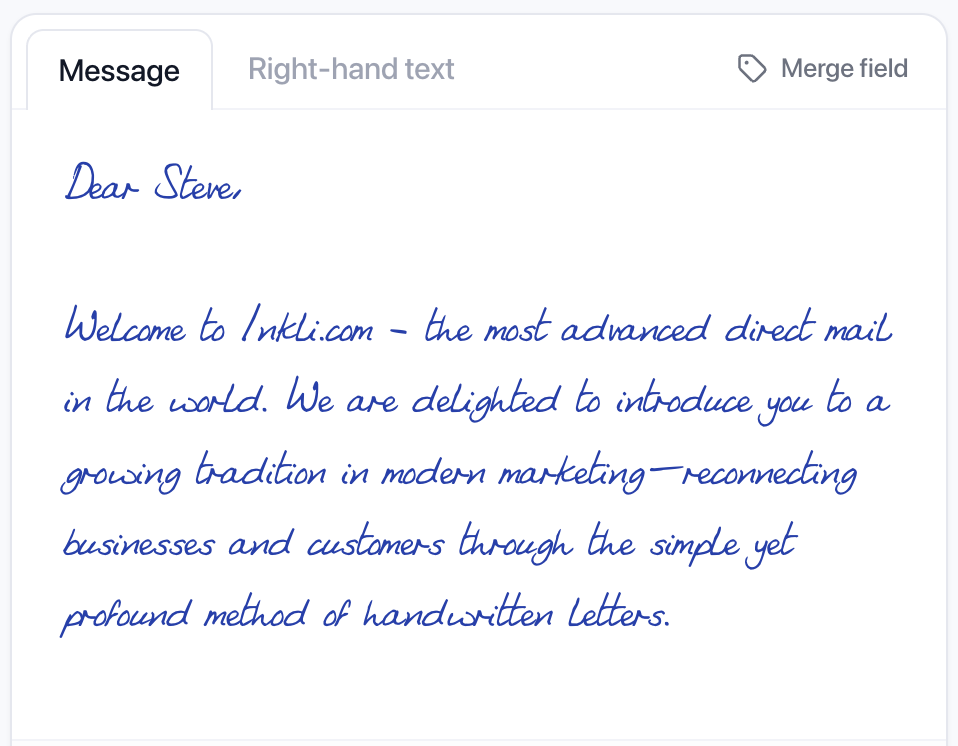
Write your message
Compose in the editor with your chosen handwriting style
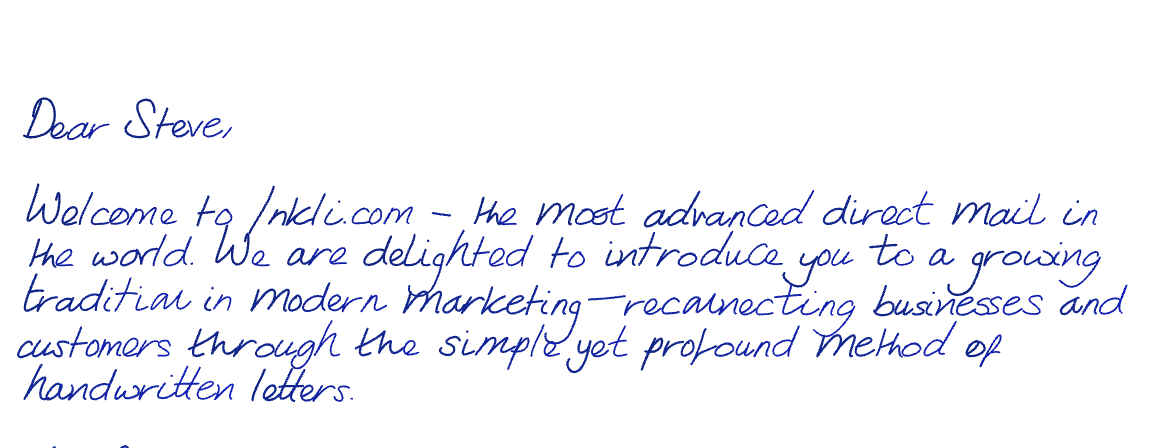
Ink preset applied
Gel ink — saturated colour with natural bleed, density variation, and per-character texture
AI Ink Studio
Describe your ink. We'll build it.
Tell the AI what your ink should look and feel like — colour, texture, behaviour — and it generates a full shader preset in seconds.
No sliders, no guesswork. Just describe the ink you imagine and the AI translates it into a complete ink preset — including colour, bleed, density, and texture parameters.
A deep forest-green fountain pen ink with subtle gold shimmer and heavy bleed on the downstrokes
Built your preset — deep green base with gold metallic shimmer, high bleed on vertical strokes, and natural pooling at stroke endpoints.
Style Controls
Ink types & handwriting defects
Inkli gives you granular control over every aspect of the generated handwriting — from the type of ink to the individual imperfections that make it look real.
Choose your ink
Fountain Ink
Classic fountain pen ink with natural flow variation and subtle bleed on paper fibres.
Classic Black
Dense, consistent black ink — sharp strokes with fine grain texture.
Gel Ink
Smooth, saturated gel pen output with even pressure and clean lines.
Red Pen
Bold red ink — ideal for annotations, signatures, or standout personalisation.
Green Pen
Rich green ink for a distinctive, memorable tone that stands apart.
Defect controls
Baseline drift
Gradual rise or fall of the writing line across the page
Kerning
Fine control over letter spacing — tighter or looser character pairs
Ink bleed
How much ink spreads into the paper fibres at stroke edges
Capital darken
Extra ink weight on capital letters for natural pen-down emphasis
Word gradient
Subtle ink fade across each word as the pen lifts and returns
Character variation
Subtle differences each time the same letter is drawn
Indent
Inconsistency in line-start position — mimics natural paragraph indentation
…and 20+ more controls
Output
Print ready
Overlay handwriting onto your existing PDF letterhead, or download standalone pages — ready to print in-house or send to a production partner.
Overlay to PDF
Upload your branded letterhead or card template. Inkli overlays the handwritten content precisely where you need it — logos, headers, and design intact.
Download standalone
Generate clean handwritten pages without a template. Download the batch as individual PDFs or a single merged file — ready to print.
For platform partners
Everything above, wrapped in the operational primitives your team actually needs.
The render engine is the moat — but for direct mail houses, agencies, and print shops, the platform underneath matters just as much. Here's what you plug in.
Print-production output
PDF/X-4 with your embedded ICC profile (FOGRA51, GRACoL, SWOP, or upload your own). Bleed marks and trim boxes ready for finishing. The format your Xerox iGen or HP Indigo actually wants — not a "won't someone convert this?" starting point.
Delivered to your infrastructure
Configure a delivery target once (SFTP or S3-compatible) — every campaign's output pushes there straight from the render fleet. No download portal. No manual step. Your print floor's hot folder is the first thing that sees the PDF.
Real API, real webhooks
Production REST endpoints with pk_live_ / pk_test_ keys, Idempotency-Key on writes, and HMAC-signed webhooks (campaign.completed, campaign.failed, proof.ready). Fits into whatever CI + ops workflow you already have.
White-label, always
The output PDF has no Inkli branding. Your customer sees your invoice, your file naming, your artwork. The rendering engine is ours; the customer relationship is entirely yours.
Ready to see it in action?
Talk to sales if you're integrating; sign up if you just want to try it.